PHOTO QUALITY & INPUT · NOVEMBER 10, 2026
Coloring Page Maker: Do Soft Shadows Become Extra Lines?
In one controlled test, a thresholded dark-pixel count in a broad lower-right area fell from 5,091 to 4,429 as the soft shadow grew darker. The area includes part of the mug edge, so it cannot isolate a shadow outline.
Open the Maker · Maker Help & Guides
What we tested
We created three 640 × 480 PNGs with the same simple blue mug on a white background. The first had no cast shadow. The other two added the same soft gray elliptical shadow at two strengths: alpha 70 and alpha 145, each blurred with a 24-pixel Gaussian blur. These were hand-constructed images, not photographs.
Each image was opened in the production Coloring Page Maker in Chrome, with Clean Outline and A4 selected. We saved the PNG download for each. All three files measured 3508 × 2480 pixels. In a fixed lower-right region of each output, we counted pixels whose red, green, and blue channels were all below 150. That region includes part of the mug's lower edge as well as surrounding space.
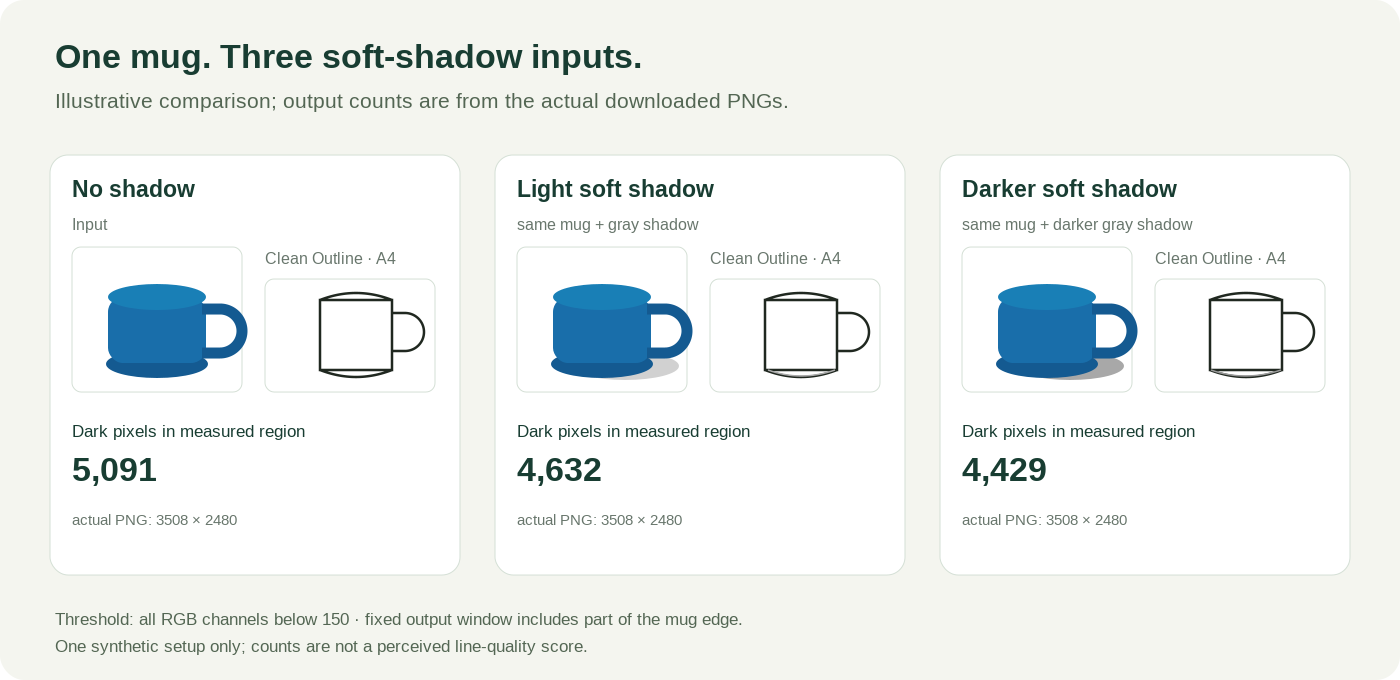
The counts were 5,091 for no shadow, 4,632 for the lighter shadow, and 4,429 for the darker shadow. The 662-pixel difference is about 13% of the no-shadow count in this region. The region includes part of the mug's lower edge, so the count cannot tell whether a shadow itself became a line. The generated pages showed faint gray transitions around the mug base; this threshold is not a score for perceived line quality.
What this means for your photo
A soft cast shadow may be muted in the generated outline, while subtle gray marks can remain near an object's edge. Preview the base of the subject before downloading. If that area looks busy, try a more evenly lit photo or compare another line style. The result can vary with the image and settings.
This test used one synthetic mug, two shadow strengths, one Chrome run, Clean Outline, and A4. It did not test real photos, other styles, other browsers, PDF files, or physical printing. The measurements and test method include the inputs and counting rule. For related advice, see the blurry-photo guide and image requirements.
Read or watch the soft-shadow video guide, try the Coloring Page Maker, or browse Maker Help & Guides.